
지난 편에서 pi에게 스네이크 게임을 한 방에 만들게 했더니, 보기엔 멀쩡한데 로드하자마자 게임오버가 되는 버그가 있었습니다. 이번 편에서는 그걸 다시 pi에게 시켜서 고치고, 게임을 제대로 다듬습니다.
1. “읽고-고치는” 루프
코딩 에이전트의 진짜 힘은 한 방에 완벽한 코드를 뽑는 게 아니라, 이미 있는 코드를 읽고 고치는 반복에 있습니다. pi는 print 모드에서도 read 도구로 파일을 먼저 읽고 edit으로 수정합니다.
버그 원인(정지 상태에서 자기 충돌)과 함께, 김에 거슬렸던 잔버그들도 한 번에 묶어서 지시했습니다.
set -a; . ./.env; set +a

pi -p --provider google --model gemini-3.1-flash-lite \
   --api-key "$GEMINI_API" --no-session \
"Read index.html (a Snake game) and fix these bugs by editing the file in place:
1. CRITICAL: On load the snake is idle (dx=0,dy=0) but the update loop still runs, so the self-collision check immediately triggers GAME OVER. Fix: when dx===0 && dy===0, skip movement/collision but still render the board each tick. The game should sit idle on a visible board until the player presses a direction key.
2. Draw the FOOD in a clearly different color from the snake. Snake stays #e8734d; draw food in #ffffff (white).
3. Space/Enter should ONLY restart when the game is already over, not mid-game.
4. spawnFood must never place food on a cell occupied by the snake.
5. Draw the board immediately on reset so it is visible before the first move."
약 8초 뒤 pi가 고친 내용을 요약해줬습니다.
1. Idle State Fix: skip movement/collision when dx,dy=0, still call draw()
2. Food Color: white (#ffffff)
3. Restart Logic: space/enter only when overlay visible
4. Spawn Food: loop until not on snake
5. Immediate Render: spawnFood() + draw() on reset
핵심 수정은 update() 맨 앞에 정지 상태 가드가 들어간 것입니다.
function update() {
    if (dx === 0 && dy === 0) {   // 아직 시작 전이면
        draw();                   // 보드만 그리고
        return;                   // 움직이지 않는다
    }
    ...
}
2. 고쳐졌나? — 확인
브라우저로 다시 열어봤습니다.
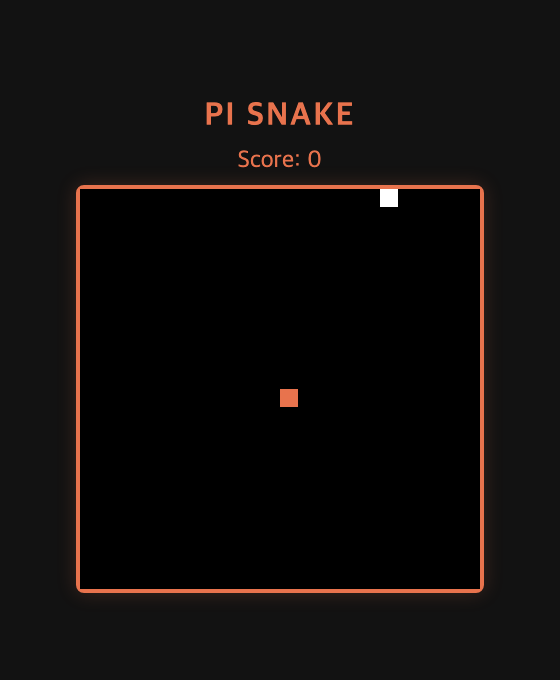
이제 시작하자마자 죽지 않고, 가운데 뱀 머리(주황)와 먹이(흰색)가 보이는 정지 상태로 대기합니다. 화살표/WASD를 누르면 그때부터 움직이고요. 먹이 색도 뱀과 구분되고, 게임 중에 스페이스를 눌러도 리셋되지 않습니다. 플레이 가능한 게임이 됐습니다.
3. 디테일 더하기 — 폴리시 한 라운드
기본이 돌아가니 이제 “있으면 좋은” 것들을 한 번 더 시켰습니다. 역시 print 모드 한 줄.
pi -p --provider google --model gemini-3.1-flash-lite \
   --api-key "$GEMINI_API" --no-session \
"Read index.html (a working Snake game) and add these polish features, keeping it in one file:
1. HIGH SCORE: persist the best score in localStorage key 'pi_snake_best'. Show it as 'Score: 0   ·   Best: N' and update when beaten.
2. GRID: draw faint grid lines (rgba(255,255,255,0.05)).
3. START HINT: while idle and not game over, draw centered 'Press an arrow key to start' in a muted color.
4. GAME OVER: if the final score is a new best, also show 'New Best!' in the overlay."
결과:
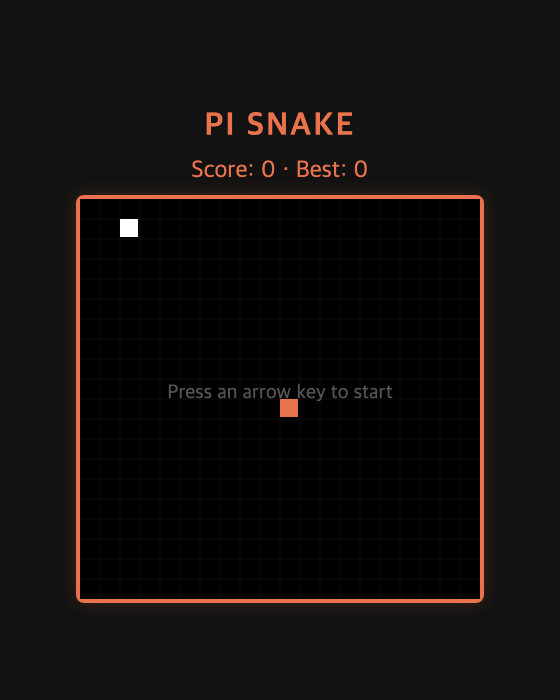
- 헤더에
Score: 0 · Best: 0— 최고 점수가localStorage에 저장돼 새로고침해도 유지됩니다. - 보드에 은은한 그리드 — 칸이 보여서 훨씬 게임 같아졌습니다.
- 대기 중엔
Press an arrow key to start안내 문구.
세 라운드(생성 → 버그수정 → 폴리시) 만에, 빈 폴더가 하이스코어까지 저장하는 스네이크 게임(단일 index.html, 약 6.4KB)이 됐습니다.
이번 편 정리
- 코딩 에이전트는 “읽고-고치기” 반복에서 빛난다.
"Read index.html and fix..."한 줄이면 충분. - 요구사항을 번호로 쪼개서 주면 가벼운 모델도 빠뜨리지 않고 처리한다.
- 생성 → 수정 → 폴리시 각 라운드가 8~10초, 전부 무료 모델로.
다음 편에서는 “그래서 무료 flash-lite로 코딩 에이전트를 돌려본 솔직한 후기” — 호출 수·비용, 잘하는 것과 못하는 것, 자동화 팁을 정리하며 시리즈를 마무리합니다. 감사합니다!